Start your risk assessment
Risk assessmentThe six stages, what to finish first, how your answers save, and what you get at the end.
The risk assessment walks your team through the risks your camp faces, how serious each one is, what you already have in place, and what you’ll work on next. Everything you answer builds your camp’s Safety Roadmap.
Most camps work through it over a few sittings. Nothing is locked: once your camp profile is ready, you can open any stage, in any order, and come back whenever things change.
Where to find it
Choose Risk Assessment in the sidebar. You need to be in a camp to use it. If you aren’t in one yet, see Join your camp with a camp code, or Set up your camp if nobody has added it yet.
The first page is the overview. It lists the six stages, shows whether each is Done, In progress or Not started, and counts what’s left, such as “12 to answer”. The button at the top takes you to the right place:
- Start with your camp profile if your profile still needs answers
- Continue with and the name of the next stage with work left in it
- Open your roadmap once nothing is outstanding
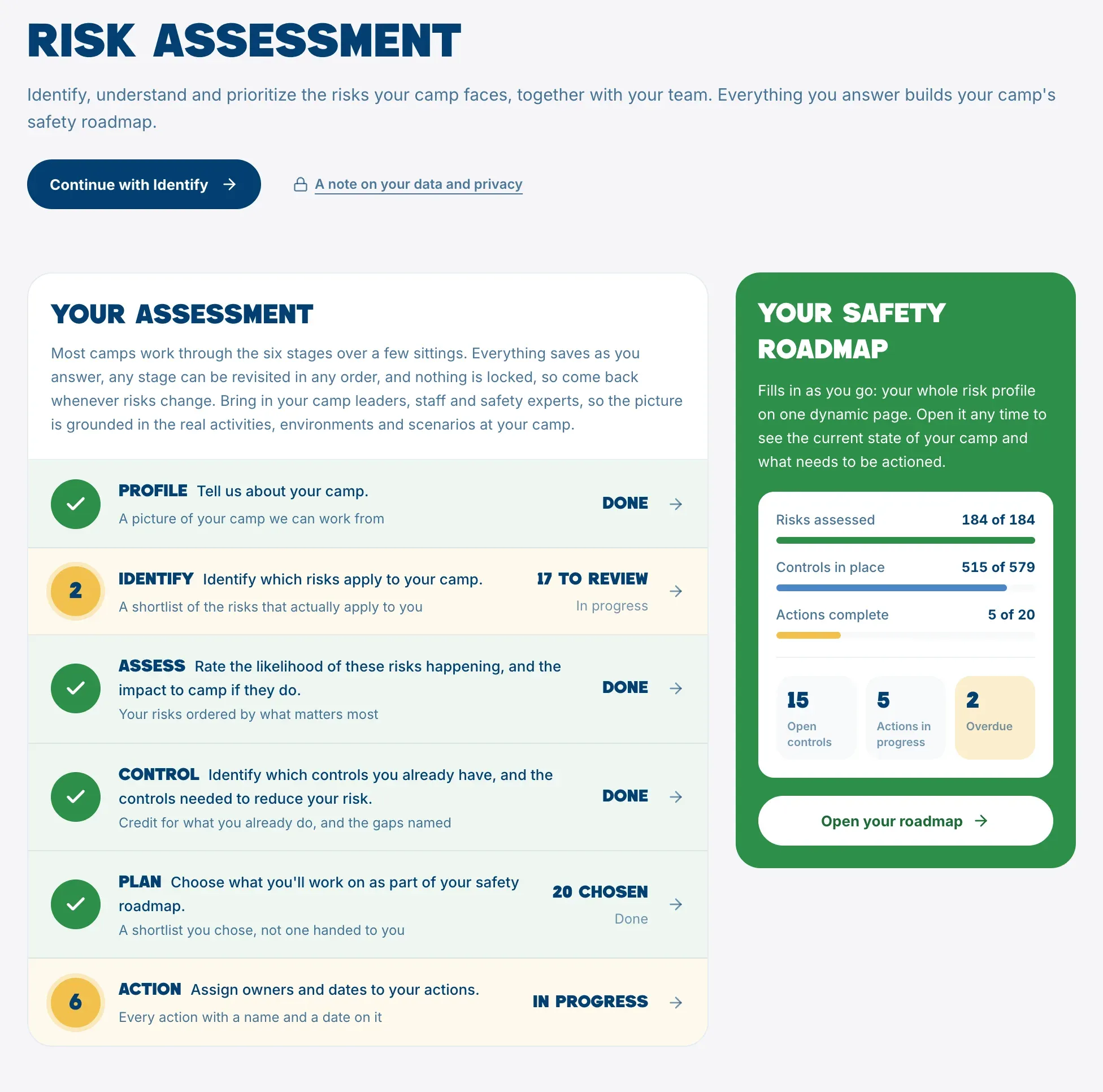
The six stages
- Profile. Tell us about your camp: what you run, your setting, your facilities and your people.
- Identify. Decide which suggested risks apply to your camp. See Identify your risks.
- Assess. Rate how likely each risk is and how much harm it could do. See Assess likelihood and impact.
- Control. Record the controls you have and the ones you need. See Record your controls.
- Plan. Choose what you’ll work on. See Build your safety plan.
- Action. Write each action, give it an owner and a date, and get it done. See Assign and track actions.
Click any stage on the overview to open it. Inside a stage, the strip at the top shows all six (on a phone, as numbers), so you can jump between them. Overview at the top left takes you back to the overview page, and the buttons at the bottom of each stage move you to the stage before or after. On the last stage, the button reads Your roadmap.
Not sure what a stage is for? Click the small i next to its subtitle to read a short explanation.
Finish the essential profile questions first
Stages 2 to 6 open once the essential questions in your camp profile are answered, because those answers decide which risks the assessment suggests. There are ten:
- Camp model
- Activities
- Water exposures
- Flood exposure
- Wildfire exposure
- Emergency response and services
- Weather exposures
- Facilities
- Staff aged 18 or under
- Number of sites
For the two number questions, 0 is an answer, so enter 0 if it’s true for your camp rather than leaving it blank.
Until all ten are answered, stages 2 to 6 show Finish your camp profile first, list what’s Still to answer, and offer Go to your camp profile. The profile shows a Ready for Assessment badge when the essentials are done. The other profile questions are worth answering too, but they don’t hold anything up. See Your camp profile.
It saves as you go
There’s no submit button. Every answer saves the moment you give it, and the top of the page shows Saving… and then All changes saved (on a phone, Saved). You can stop at any point and pick up where you left off. See Work on it together for what happens when several people are working at once.
Who can work on it
Everyone in your camp, whether a Camp Admin or a Camp Member, can work on every stage. See Who can do what in your camp.
To see who else can view your answers, choose A note on your data and privacy on the overview page.
What you get at the end
Your answers build your Safety Roadmap, in the sidebar. It summarizes your risks, controls and actions, tracks your progress over time, and lets you export three reports to print or save as a PDF. See Your Safety Roadmap and Export your reports.