Build your safety plan
Risk assessmentStage 5. Choose which of the actions your controls raised you'll take on, using the priority groups to compare value against effort.
Every control you marked Partially in place or We need this in Record your controls raised an action. In Plan, stage 5, you choose which of those actions you’ll work on. The ones you choose make up your safety plan.
You don’t have to take everything on. Anything you leave out stays on your register, isn’t lost, and can be added to your plan whenever you’re ready. Leaving work out is never flagged as a problem.
Add actions to your plan
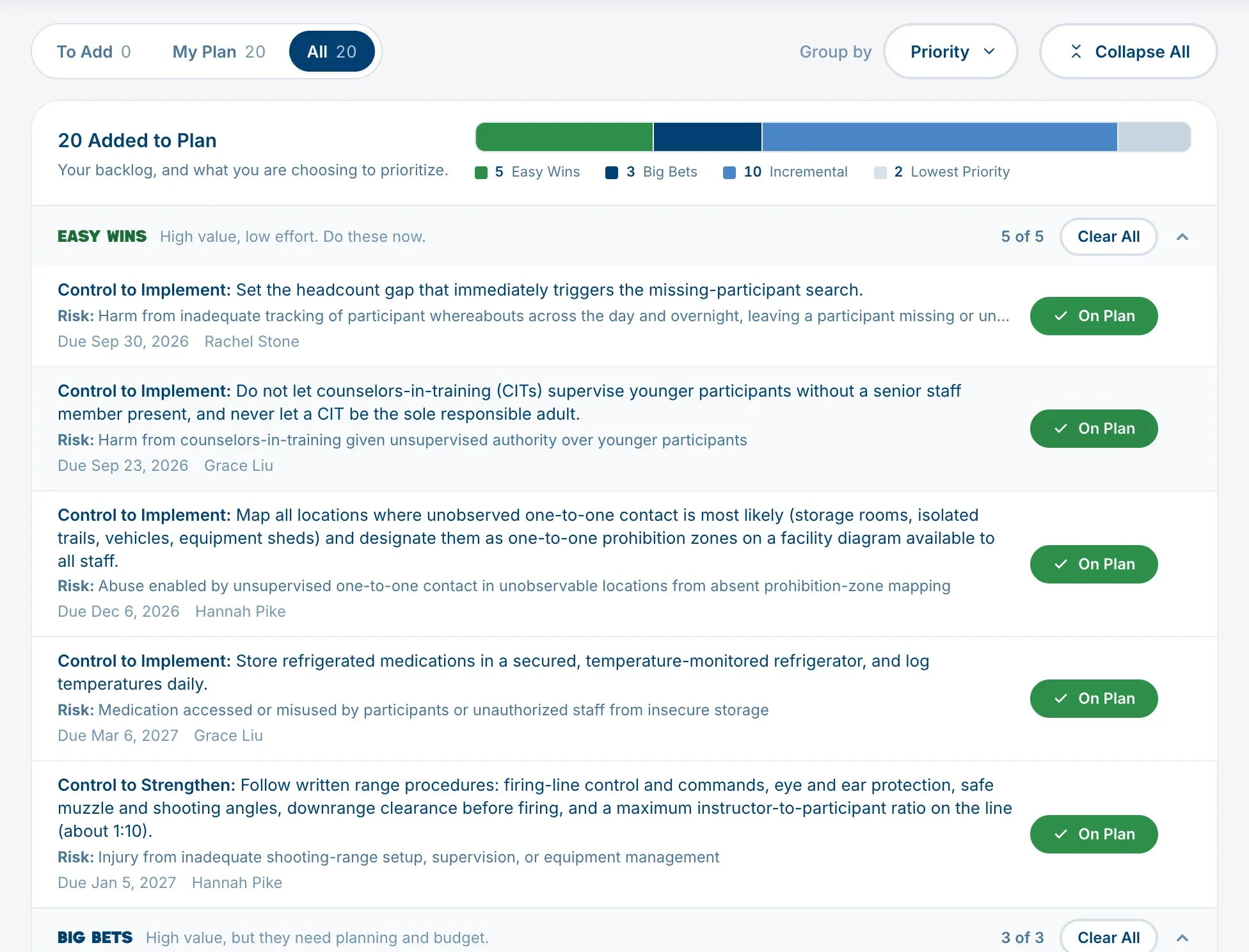
Each row is one action, with the risk it belongs to. On the right:
- Add puts the action on your plan. The button then reads On Plan.
- Click On Plan to take it off again.
- Add All beside a group adds every action in it. Once they’re all on, it reads Clear All.
Each change saves straight away. The count at the top, such as “18 Added to Plan”, shows how many you’ve chosen.
How the priority groups work
By default, actions are grouped by priority. The platform sorts them by two things:
- Value: how much the action would bring its risk down. It’s higher for a more serious risk, for a type of control that counts for more, and for a control you don’t have at all yet rather than one that’s partly in place.
- Effort: how much work it’s likely to take, Low, Medium or High. TSN sets a starting effort for each control, and you can change it in the Action stage.
Together they give four groups:
| Group | Value | Effort |
|---|---|---|
| Easy Wins | High | Low |
| Big Bets | High | Medium or high |
| Incremental | Low | Low |
| Lowest Priority | Low | Medium or high |
“High value” is measured against your own camp’s actions, not a fixed number, so every camp gets a split it can use. The groups are a starting point for your conversation, not a ruling: you know your camp, your budget and your season.
Find your way around
- Tabs: To Add (actions not on your plan yet), My Plan and All.
- Group by: Priority, or Risk to see every action for one risk together.
- Expand All opens every group.
If there’s nothing here
If the stage says There is nothing to plan yet, no control has been marked as partly in place or needed. Go back to Record your controls.
When this stage is done
Plan is done once your plan holds at least one action. Next, write each action and give it an owner and a date in Assign and track actions.